 Yono
YonoUpdated 24 October 2026.
Casino
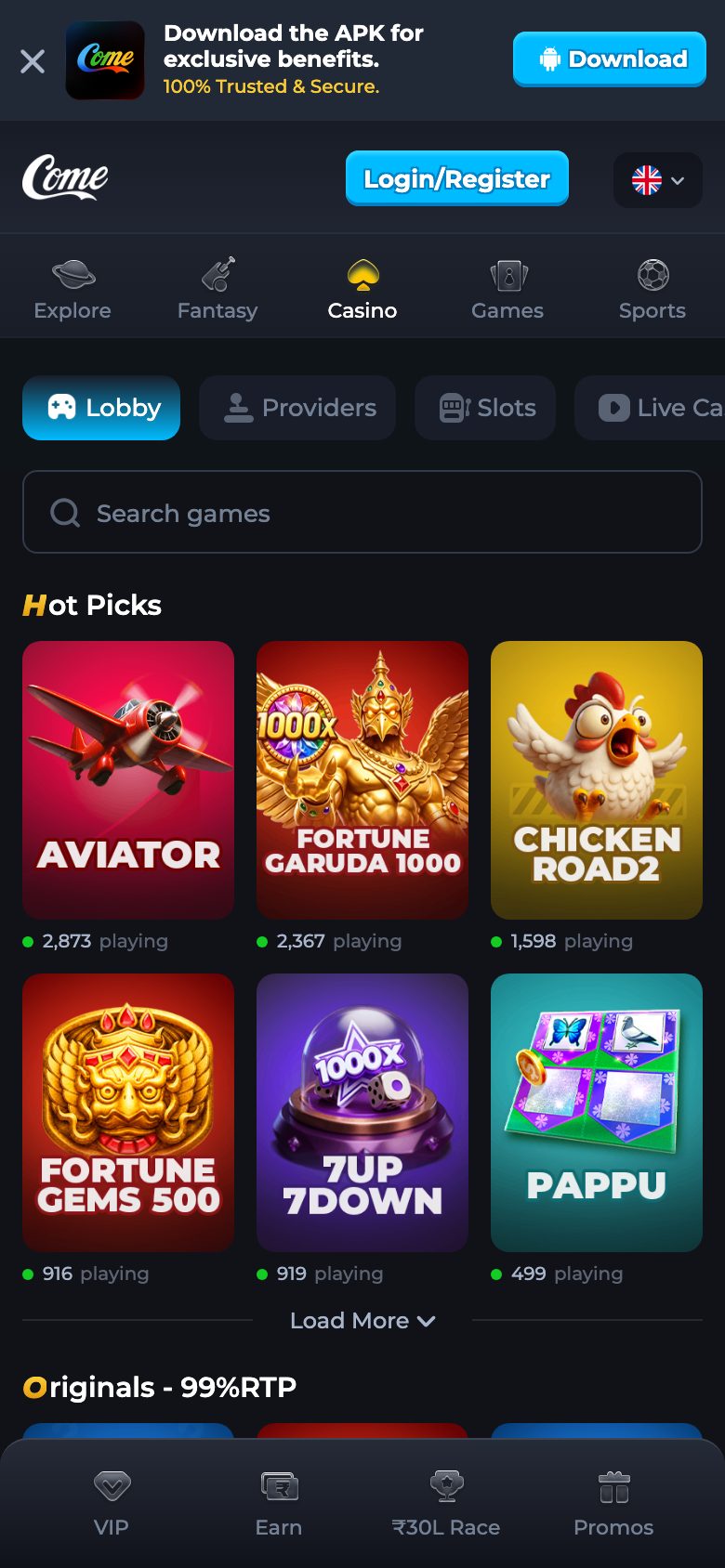
Casino is a navigation label and a history tab. Open it from the channel after login. Inside a game, use Game Info for Rules and Limits, My Bets for your rows, and Live Stats for the session filters. This page does not add a list of tables the strings did not name.
When this applies
Use this guide when you have tapped Casino, or when you are about to, and you want to know which controls are the useful ones. Use it when you are looking for a rule or a limit and the tile itself is mostly a picture. Do not use it to learn fantasy lineups or Rummy history. Those are separate navigation items and separate guides.
If Casino is not on your screen, you are probably not logged in, or you are in a different app. The directory lists the labels that should appear. The login guide gets you to them.
What opening Casino does
It shows the channel’s casino area. Individual tiles beyond Crash, Plinko, and the other names on the directory were not copied into this page, because a guide that borrows a popular table list would be describing a different site. If a tile is in front of you, its name is the name to trust. Open Game Info before you rely on memory.
Game Info is titled Game Info. It has Rules, Limits, Max Bet, and Max Payout. Rules are the channel’s explanation of that game. Limits are the channel’s ceilings. This guide will not type the ceiling numbers, because they belong to the game you opened and they are already on that screen.
Do this
- Log in on the channel or in the app at version name 1.0.1.
- Tap Casino in the navigation. Do not tap Fantasy or Rummy if casino was the job.
- Tap a tile you intend to read. If you do not recognise the name, open Game Info and read the title there before you commit a stake.
- Open Rules, then Limits. Note Max Bet and Max Payout as labels. Read the figures on the screen. Do not expect this website to repeat them.
- If you want your own recent rows, open My Bets. Columns you will meet elsewhere in history include time and amount. An empty list means this session has no rows yet.
- Open Live Stats if you want the session summary. Filters include All, Bets, Race, Profit, Wagered, Wins, and Losses. A prize filter is also labelled. No rows is a normal empty state.
- When you leave, the Casino tab of game history is where those casino rows remain. Rummy rows stay on the Rummy tab. Sports rows stay on Sports.
The Casino history tab
Game history labels the tabs Casino, Rummy, and Sports. The Sports wording is the fantasy side, even though the navigation also says Fantasy. On the Casino tab the columns include Game, Time, Bet, Entry, Winnings, and Match. Use them to see what was recorded. They are not a tool for reconstructing a strategy, and this page will not turn a column into advice.
Loading is a state the history strings name. If the tab sits on Loading and never fills, leave it and open it again once. If it is simply empty, you have not produced a casino row in the window you are viewing.
Controls inside Casino
| Question | Open | What it will not do |
|---|---|---|
| How does this tile work? | Game Info, Rules | It will not list every other tile on the internet |
| What is the ceiling? | Game Info, Limits, Max Bet, Max Payout | This website will not copy the number |
| What did I just do? | My Bets | It will not show another person’s account |
| How has this session moved? | Live Stats filters | It will not predict the next round |
| What was recorded earlier? | Game history, Casino tab | It will not move Rummy rows onto this tab |
Labels next to Casino that are easy to confuse
Original is a different category. Dice and Mines live in that wording, under Play Coins, and they have their own guide. Crash and Plinko have history screens of their own even though people lump them with casino. Use the Crash and Plinko guide when the title you opened is one of those two. Stay here when the navigation word you tapped was Casino and the tool you need is Game Info or the Casino history tab.
Deposit is not inside the tile. It is its own navigation item. A deposit status does not appear as a casino bet. If the balance looks wrong, the result-history guide points at Transaction History and at the Customer Service label. Still no clock time is added by this page.
After you have found the control
Read Rules once before you play a tile you have not opened before. Then the channel, not this paragraph, is the game. If you only wanted to know whether Casino is separate from Rummy, you can stop: it is a separate navigation item and a separate history tab.
Download is irrelevant at this point unless the icon you are using is not version name 1.0.1. A correct casino screen does not require a fresh apk.
If Casino will not open
Confirm you are past login. A Log In form has no Casino tiles behind it until Continue succeeds. Confirm you are not in the bank app. Confirm the tab is the Play channel and not a directory of other brands. If the channel shows a pop-up error about a new window, allow pop-ups. That message is “Unable to open a new window. Please check your browser's pop-up.”
If one tile opens and another does not, use the tile that opens and its Game Info. Do not replace the apk because a single tile failed. There is one file on the app guide, and a tile error is not a new version name.
What this casino page will not claim
It will not claim a count of games, a provider list, or a jackpot figure. It will not name tables that were not in the strings we are using. It will not tell you a bet to place. Rules and Limits on the open game are the boundaries that exist. This page only tells you where they are written.
Questions
Which casino games are listed here?
The page does not add a table list. Use the tile names on the channel. Crash, Plinko, Dice, and Mines have their own guides because their history or Play Coins strings named them.
Where are the betting limits?
Game Info, under Limits, on the game you opened. Max Bet and Max Payout are the labels. The numbers stay there.
Where are my casino bets?
My Bets inside the game, and the Casino tab of game history.
Is Rummy inside Casino?
It has its own navigation item and its own history tab. Use the rummy guide.
Can this page see my account?
No. It describes labels. The rows are on the channel after you log in.